• Logo
  • Pricing
  • About
  • Blog
  • Docs
  • Videos
  • Portal
    Portal
  • Portal
    Portal
  • Introduction to YakShaver
  • Tips to creating the perfect work item
  • FAQ
  • Setting up YakShaver for your Organization
  • Setting up Microsoft Teams
  • Setting up Snipping Tool (Windows)
  • Setting up Xbox Game Bar (Windows)
  • Setting up Screenshot App (MacOS)
  • Setting up the YakShaver browser extension
  • Install YakShaver Browser Extension Manually
  • Setting up Snagit
  • Setting up third party recording tools
  • Recording Shaves on Your Mobile Phone
  • Connecting your GitHub account
  • Adding Azure DevOps projects
  • Adding External Users
  • Connecting your YouTube channel to a project
  • Specify the project backlog you want
  • Giving Context
  • Mentioning users in work item descriptions
  • Using nicknames
  • Making your videos permanent (using YouTube)
  • Configure custom prompt
  • How YakShaver credits work
  • Switch to a different plan
  • Troubleshooting
  • Support

Table of Contents

  • Introduction to YakShaver
  • Tips to creating the perfect work item
  • FAQ
  • Setting up YakShaver for your Organization
  • Setting up Microsoft Teams
  • Setting up Snipping Tool (Windows)
  • Setting up Xbox Game Bar (Windows)
  • Setting up Screenshot App (MacOS)
  • Setting up the YakShaver browser extension
  • Install YakShaver Browser Extension Manually
  • Setting up Snagit
  • Setting up third party recording tools
  • Recording Shaves on Your Mobile Phone
  • Connecting your GitHub account
  • Adding Azure DevOps projects
  • Adding External Users
  • Connecting your YouTube channel to a project
  • Specify the project backlog you want
  • Giving Context
  • Mentioning users in work item descriptions
  • Using nicknames
  • Making your videos permanent (using YouTube)
  • Configure custom prompt
  • How YakShaver credits work
  • Switch to a different plan
  • Troubleshooting
  • Support
DOCSADDING EXTERNAL USERS

Adding External Users

Loading last updated info...

Have you invited guests to your Microsoft organization and want to tag them in PBIs and emails?

Here’s how to allow YakShaver to find and tag them.

Prerequisites

  • You must be an Admin of your tenant in YakShaver
  • The external user must be invited as a guest to your Microsoft Organization

Step-by-Step Instructions

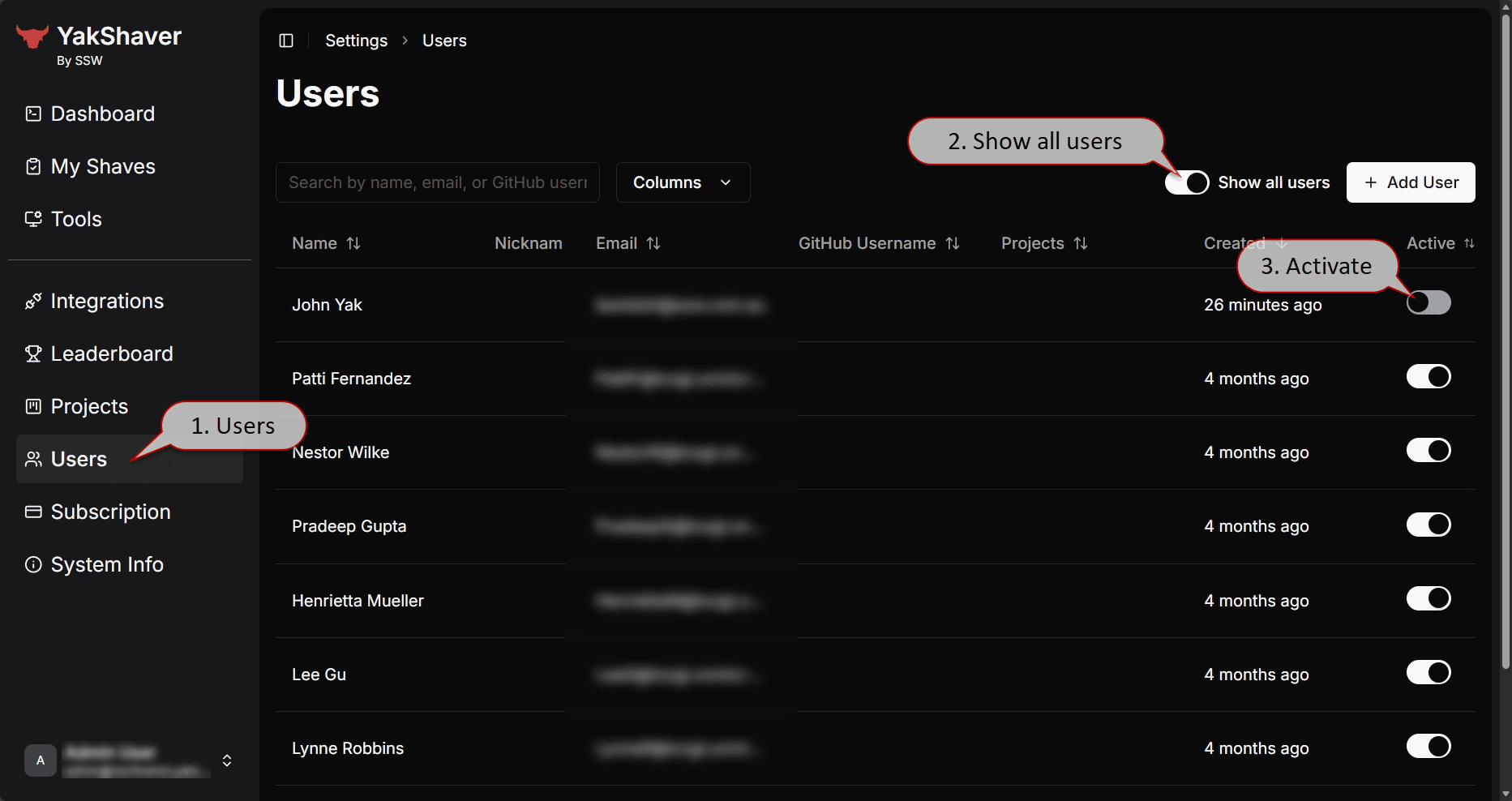
  1. Log in to the YakShaver Portal
  2. In the Users settings, select Show all users
  3. Activate the external user
  4. Done!

Image Figure: Adding external users in three easy steps!

Adding Azure DevOps projectsConnecting your YouTube channel to a project
© 2025 SSW YakShaver. All Rights Reserved | Privacy Policy
TinaCMS logoPowered by TinaCMS